
Your desk is the command center of your workday. Whether you work from home full-time or just need a focused corner for side projects, the environment around you shapes how clearly you think and how much you get done. The good news is that you do not need a massive budget or a complete renovation to transform your workspace. A few targeted upgrades can dramatically improve both your productivity and your enjoyment of the space.
At Relxday, we believe that small, thoughtful changes create the biggest impact. Here are five home office desk upgrades that boost productivity, along with budget-friendly options and a before-and-after comparison for each.
Upgrade 1: A Custom LED Desk Sign
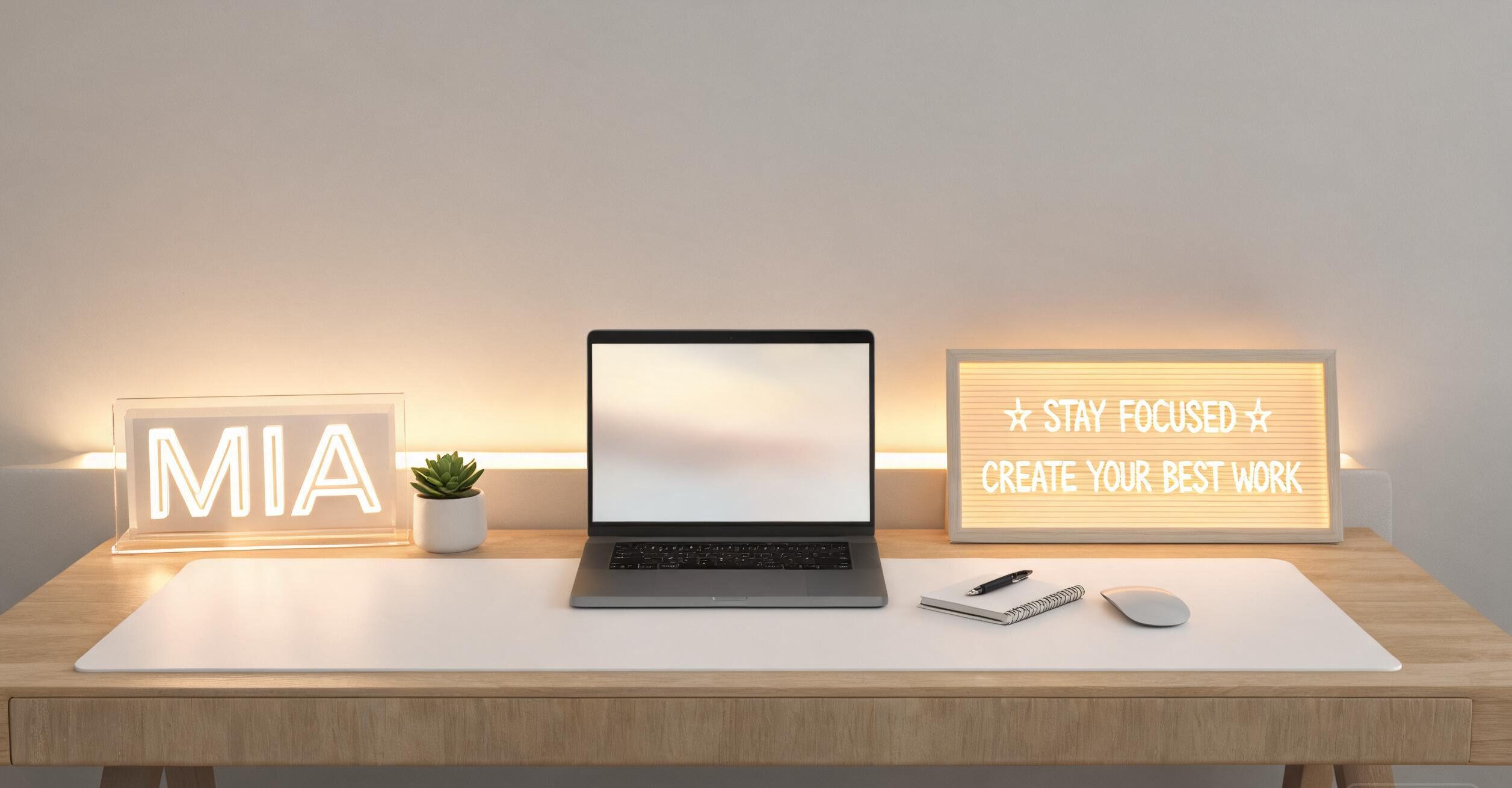
Your desk should feel like yours. A custom LED desk sign does more than display your name or title. It sets the tone for the entire workspace. When you sit down and see your name glowing softly on the desk, the space transforms from a generic table into a personal command center. That psychological shift primes your brain for focused work.
Beyond the psychological benefit, a desk sign also has practical value. If you share a home with family or roommates, a lit sign can signal “I am working, please do not disturb” without a single word. It creates a boundary in shared spaces. And if you take video calls from your desk, a tasteful LED sign adds a professional, polished backdrop that looks intentional rather than accidental.
We recommend the RX09 Custom Acrylic Desk Sign Name Plate from Relxday.
Product: RX09 Custom Acrylic Desk Sign Name Plate
Price: $34.49 to $36.02
Why it works: This desk sign combines a clean acrylic panel with a warm LED base that illuminates your custom text. It is compact enough to sit at the edge of any desk without taking up valuable workspace, and the glow adds ambient lighting that reduces eye strain during long sessions. Personalize it with your name, your business name, or a motivational phrase.
You can browse more desk and office accessories at the Relxday shop.
View the RX09 Custom Desk Sign
Before and after
Before: A bare desk with no personal marker. The space feels temporary, like a hotel desk you are just passing through. Motivation is low, and interruptions are frequent because family members cannot tell when you are working.
After: A lit desk sign clearly marks your territory. The glow signals focus mode. You feel ownership of the space, and others respect the visual cue. The professional backdrop elevates every video call.
Upgrade 2: An LED Message Board for Notes and Reminders
Productivity lives or dies on how well you manage information. Sticky notes pile up, notebooks get buried, and phone reminders get swiped away. A dedicated LED message board solves this by giving your most important tasks and reminders a single, visible home that you cannot ignore.
Unlike a plain whiteboard, an LED message board adds light to your notes. This serves two purposes. First, the illumination draws your eye to the board, making it harder to forget what you wrote there. Second, the soft glow contributes to the overall ambiance of the desk, especially in the evening when natural light fades. It is a productivity tool and a decor piece in one.
Consider the RX02 LED Message Board, which functions as both a note surface and a 3D night light.
Product: RX02 LED Message Board 3D Night Light
Price: $16.92 to $50.92
Why it works: This versatile board lets you write messages, to-do lists, and reminders with the included markers, then illuminates them with a warm LED glow. By day it is a functional message board. By night it becomes a soft desk light that keeps your workspace visible without the harshness of overhead lighting. It is perfect for leaving yourself a morning reminder or a motivational quote.
View the RX02 LED Message Board
Before and after
Before: Sticky notes scattered across the desk, half of them lost under papers. You forget tasks because they are out of sight. The desk looks cluttered and chaotic.
After: A single illuminated board holds your top three priorities for the day. The glow keeps them in view. The desk looks organized, and nothing important slips through the cracks.
Upgrade 3: A Desk Plant for Focus and Air Quality
It might sound surprising, but adding a plant to your desk is one of the most evidence-backed productivity upgrades you can make. Studies have shown that the presence of indoor plants in workspaces reduces stress, improves attention, and even increases productivity by measurable amounts. Plants also humidify the air and can filter certain pollutants, making your breathing environment healthier.
You do not need a green thumb. Choose a low-maintenance variety like a snake plant, a pothos, or a ZZ plant. These tolerate low light and infrequent watering, which makes them ideal for desk life. Place the plant at the edge of your desk or on a small shelf above it, where you can see it without it crowding your working surface.
Before and after
Before: A sterile, artificial desk surface. Nothing alive in sight. The space feels cold and institutional.
After: A small green plant softens the hard edges of monitors and stationery. Your eye has a natural place to rest during thinking pauses. The air feels fresher, and the desk feels like a space where a human works, not a machine.
Upgrade 4: Thoughtful Light Positioning
Lighting is the most underestimated productivity factor on any desk. Too dim, and you strain your eyes, feel drowsy, and lose focus. Too harsh, and you get headaches, glare on your screen, and a clinical feeling that drains motivation. The goal is layered, adjustable lighting that you can tune to the task and the time of day.
Start with natural light. Position your desk perpendicular to a window if possible, so light comes from the side rather than directly in front of or behind you. This minimizes screen glare while still giving you the mood and focus benefits of daylight. Add a warm desk lamp for evening work, and consider the LED glow from your desk sign or message board as a third, ambient layer. The combination creates a space that feels lit intentionally rather than accidentally.
Before and after
Before: A single overhead light casting shadows across the desk. Screen glare forces you to squint. By evening, the room feels dim and tiring.
After: Layered light from window, lamp, and LED accents. No glare on the screen. The desk feels bright but warm. You can work comfortably from morning to evening without eye strain.
Upgrade 5: Cord Management for a Clear Mind
Visual clutter is cognitive clutter. Every tangled cord on your desk is a small distraction your brain has to process, even if you do not consciously notice it. Over a full workday, those micro-distractions add up. Cleaning up your cords is one of the cheapest and most effective ways to reclaim focus.
You do not need expensive solutions. A pack of adhesive cord clips, a few velcro ties, and a simple cable sleeve can transform a rat’s nest of wires into a neat, hidden bundle. Route everything behind or under the desk, leaving only the essentials, like your keyboard and mouse cables, visible on the surface. The psychological effect of a clean desk edge is immediate and significant.
Before and after
Before: Cords snaking across the desk, tangled at the back, catching on your arms as you work. The visual chaos makes the desk feel smaller and messier than it is.
After: Cords vanish behind the desk, held in place by clips and ties. The surface is clean. The desk looks larger, and your mind feels less scattered.
Budget Options for Every Upgrade
You do not need to do all five upgrades at once, and you do not need to spend a fortune. Here is how to approach each one on a budget.
- Desk sign: A custom LED sign is an investment in personalization, but it replaces the need for other desk decor. Think of it as a single purchase that elevates the whole space.
- Message board: LED message boards are highly affordable and replace multiple sticky note pads and a separate desk lamp.
- Plant: A small snake plant or pothos costs under ten dollars at most garden centers and lasts for years.
- Lighting: Reposition what you have before buying new. Moving your desk relative to a window is free and often the biggest lighting improvement you can make.
- Cord management: Adhesive cord clips and velcro ties cost a few dollars for a multipack and deliver outsized visual impact.
How These Upgrades Work Together
The five upgrades are not isolated. They reinforce each other. The LED desk sign and message board both contribute to your lighting layer while serving functional purposes. The plant adds life and softens the hard lines of technology. Thoughtful light positioning incorporates the glow from your LED accessories into the overall scheme. And cord management ensures that all these additions sit on a clean, uncluttered surface where each one can shine.
The result is a desk that looks intentional, feels personal, and supports deep work. When your environment signals focus, your brain follows. This is the core idea behind every product Relxday designs for the home office.
Frequently Asked Questions
Which desk upgrade should I start with?
If you can only do one, start with cord management. It is the cheapest and fastest change, and it immediately makes every other upgrade look better. If your cords are already under control, an LED desk sign gives you the biggest psychological and aesthetic return on investment because it personalizes the entire space.
Are LED desk accessories worth the cost?
LED accessories serve double duty. They provide ambient lighting that reduces eye strain, and they add a personal or functional element to the desk. Compared to buying a separate desk lamp plus decor plus a message board, a single LED sign or message board often costs less while doing more. They also use very little electricity and last for years.
How do I reduce screen glare from my desk lights?
Position lights to the side of your monitor rather than directly in front of or behind it. Use warm, diffused light sources rather than bare bulbs. If you have a window, place your desk perpendicular to it. Adjust your monitor angle so it does not directly reflect any light source. A simple test is to turn off your screen and look at it, any light you see reflected is glare you should eliminate.
What plants work best on a desk with low light?
Snake plants, ZZ plants, pothos, and lucky bamboo are all excellent low-light desk plants. They tolerate neglect, do not need frequent watering, and stay compact. Avoid placing plants directly in front of air vents or on top of heat-generating equipment. A small pot with drainage is ideal. Water sparingly, most desk plants die from overwatering rather than underwatering.
Can a message board really improve productivity?
Yes, if you use it consistently. The key is to limit the board to your top three to five priorities for the day, not a long wish list. Seeing your most important tasks illuminated keeps them top of mind and reduces the cognitive load of remembering everything. Review the board each morning, update it throughout the day, and clear it each evening to signal the end of work.
How much desk space do I need for these upgrades?
A standard desk of about 120 centimeters wide provides enough room for all five upgrades. The LED desk sign and message board are compact and sit at the edges. A small plant takes up minimal surface area. Cord management happens behind and under the desk. If your desk is smaller, prioritize the sign and cord management first, as they deliver the most impact per square centimeter.
How often should I refresh my desk setup?
A good rule of thumb is to reassess your desk every three to six months. Tasks and seasons change, and your setup should adapt. Swap the message on your board weekly, adjust your lighting as daylight hours shift with the seasons, and repot your plant when it outgrows its container. Small refreshes keep the space feeling fresh and prevent productivity from stagnating.
Your desk is where ideas become reality. With these five upgrades, you can turn an ordinary surface into a workspace that supports focus, creativity, and pride. Start with one change, feel the difference, and build from there. Light up your workspace and your productivity with Relxday.